

How To Use Imglarger To Remove Noise And Artifacts From An Old Portrait
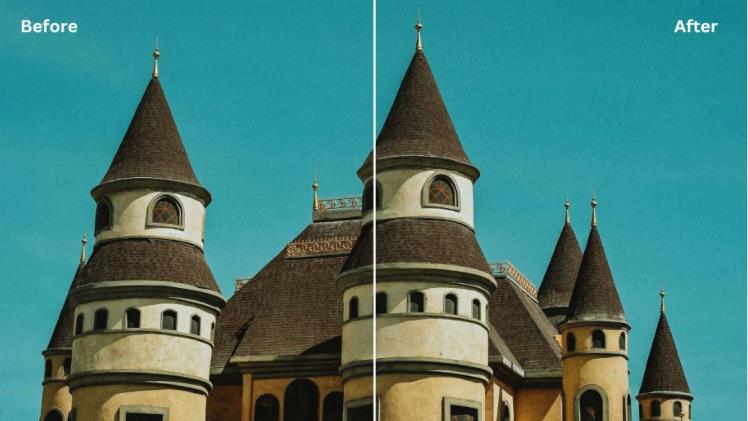
Ever looked at a dark photo filled with tiny dots? That’s called photo noise. Usually, it’s because of dim light or a camera setting called ISO. No worries! With imglarger AI Denoiser, you can easily clean up those dots and make your photos look great again! This tool is helpful when it comes to fixing old photos and making the blurry photo clear. After using this image cleaner tool, your photos will look way better! Even those old, grainy photos that you thought were ruined can look crisp and clear. It’s like giving your old memories a fresh, new look! So, ready to make your old pictures shine? Let’s dive in!
Imglarger AI Denoiser – Best Noise Reducer to Fix Old Photos
Imglarger AI Denoiser
Imglarger AI Image Denoiser is an online tool that uses smart tech to clear up grainy photos. It can cleans up grainy photos and brings back their original look and feel. Unlike some other tools, it doesn’t reduce the photo’s quality. Using this online tool is easy. In just about 5 seconds, it clears up photos so you don’t have to fuss with messy pixels. Whether you’re designing websites, writing blogs, or taking pictures, give this tool a try.
Plus, imglarger has other cool tools you can use together to make your photos look even better. If you get a paid plan with mglarger, you can work on many photos at once and get even better clean-up options.
How can Imglarger AI Denoiser Help Remove Noise from Old Photos
Imglarger AI Denoiser is like a magic image cleaner for old pictures that look grainy. It uses smart tech to make those pictures clear again, without messing up the special moments they capture. In just a few easy steps, your old photos can look almost new and fresh with this tool.
The AI is trained on vast datasets of noisy and clear images. This helps it understand what noise looks like and how to differentiate it from essential image details. When you upload a grainy photo, the deep learning algorithms analyse the image, pinpointing areas with noise. Imglarger AI intelligently removes the identified noise while preserving the main elements and details of the image.
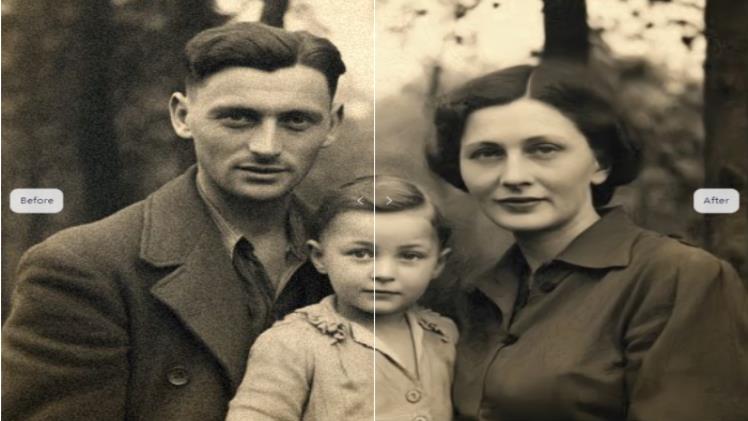
Case Study: Remove Noise from an Old Family Photo
Reviving memories from the past is a beautiful journey. Old family photos often come with a rustic charm but might also carry unwanted grain and noise over time. Let’s follow a step-by-step guide to rejuvenate such a photo using Imglarger AI Denoiser.
Step 1: Gather Your Materials
Make sure you have a digital copy of the old family photo. If it’s in a physical format, you can use a scanner or a high-resolution camera to digitize it.
Step 2: Access Imglarger AI Denoiser
Open your web browser and visit the Imglarger official website. On the homepage, select AI Image Denoiser from the drop-down menu of AI Tools. With this tool selected, you can remove image noise.
Step 3: Upload the Photo
Click “AI Image Denoiser” and go to the tool’s work page, where you will see the “Upload an image“ button. Here, you can click the button and upload the original old family photo to it. You are allowed to upload jpg or png file.
Step 4: Remove noise and grain
Now it is time to see magic! Once you click the “Start” button, imglarger noise reducer will instantly remove noise and grain from your old photo. All the details in the original picture won’t be changed at all. The noise reduction process is smooth that your original image won’t be damaged.
Step 5: Compare Before and After Results
Once you have finished the noise reduction, you can preview the before-and-after results at the same page. Drag the slider to compare the original image and the processed one. If you are happy with the noise removal result, click “Download “ to save the image to your device.
With the noise gone, distracting speckles and erratic dots that diverted attention from the main subjects are eliminated. While the picture is enhanced, it doesn’t look artificially altered. The viewer focuses more on the photo’s subjects and the story it tells.
More Tools from Imglarger to Enhance the Old Photos
AI Image Sharpener
Unlock the potential of blurry photos with the AI Image Sharpener. Often, old photos lose their crispness, but this tool uses advanced artificial intelligence to recognise soft edges and fine details, refining them for a sharper appearance. From the intricate patterns on clothing to the subtle expressions on faces, the AI Image Sharpener brings out the details that truly matter.
AI Image Enhancer
Revitalize faded memories with the AI Image Enhancer. Colors, contrasts, and details that have dimmed over time are boosted and balanced, giving old photos the vibrancy they once had. This tool dives deep into the image, adjusting various elements to ensure it looks as fresh as the day it was taken.
AI Image Upscaler
Breathe life into low-resolution photos with the AI Image Upscaler. This powerful tool can magnify images without the common pixelation or loss of quality. It’s especially beneficial for enlarging old photos taken with older cameras or stored in smaller sizes. The result? A high-definition memory ready to be proudly displayed or shared.
Why There is Noise in Old Photos
Back in the day, taking photos wasn’t as refined as it is now. When we look at older pictures and notice those grainy spots, often described as ‘noise’, it’s due to a combination of factors:
- Film Quality: Older photos were taken using film. The type of film and its quality affected the final result. Some films were more grainy, especially those designed for low light, known as high ISO films.
- Camera Quality: Older cameras didn’t have today’s advanced tech. Imperfections or limits in the camera’s lens or mechanics could introduce noise.
- Storage & Aging: As photos age, they might degrade, especially if not stored properly. This can introduce spots, discolourations, and yes, more noise.
- Scanning Process: The scanning process can introduce noise for old photos that have been digitized, especially if the scanner’s quality isn’t top-notch.
Wrap-Up | Fix Old Family Photo with Imglarger AI Denoiser
Old family pictures are like time capsules. But sometimes, they get grainy and faded. That’s where Imglarger AI Denoiser and its other old photo restoration tools come in. They help make these photos look fresh and clear again. Imglarger can turn your old pictures into treasures with easy steps and great results. So if you have old photos you want to remove noise from them, give Imglarger a try. It’s like giving your memories a fresh coat of paint in the digital world!